Everything Pomona does
A garden planner, a to-do list for the season and a garden journal in one app, on your computer and your phone. Here it is, section by section.
Planning the garden
Draw the garden as it is, cell by cell, and keep as many versions of it as you need.


Gardens and boards
A separate plan for each place you grow: the back garden, an allotment, a balcony. Each garden holds several boards, for this year's layout, next year's rotation or an idea you're trying. Duplicate a board to start from what you have.
A grid to scale
Every cell is a 20 cm square. Zoom in to work on one bed, zoom out to see the whole plot, and use the minimap to find your way around a big garden.
Beds, paths and buildings
Raised beds and flowerbeds in your own colors, fences, paths, a house, a driveway, a greenhouse and a pond.
100 plants and your own
Vegetables, herbs, fruit and flowers from the catalog, each with a color and a three-letter code. Add your own varieties with a color, a kind of plant and reminders of their own.
Quick tools
Plant brush, place plant, structures, labels and eraser. Drag for a rectangle, hold Shift for a straight line, and select an area to fill, copy, paste or clear it. Undo and redo.
Labels and layers
Name the beds with labels. Show or hide plants, structures and labels separately.
Plant counts
How many of each plant are on the board, or in the part you've selected.
Season and reminders
Pomona keeps track of what needs doing and when, from the first sowing in late winter to clearing the beds in autumn.


A season for each garden
Start a season and add the plants you're growing: how many, and whether they grow in the ground, in the greenhouse or in a container. You can take them straight from the plants drawn on the board.
Reminders that come with the plants
All 100 catalog plants come with suggested jobs, from sowing to clearing the bed, based on common practice for their kind. Change any of them, or save your version as the default for that plant.
Your dates
Set your plant-out date and season end, and greenhouse dates if you have one. Every reminder counts from these, so moving one date moves the schedule. Seasons south of the equator, which run across New Year, work too.
To-do list
Overdue, today, this week, later and no date. Tick a job off, snooze it, skip it or untick it. A repeating job counts from the day you actually did it.
Timeline
The whole season on one screen: each plant's jobs month by month, with plant-out, today and the season end marked. On a computer, or on a tablet turned sideways.
Jobs for the whole garden
Clean the greenhouse, build a bed, paint the fence. Give a job a date or leave it for whenever.
From the list to the board
Jump from a job to that plant's cells on the plan, or log a job you've done straight from the board.
Notifications
Turn them on for each device and get the day's jobs at the time you choose. The app icon shows how many are due. On iPhone and iPad, add Pomona to the Home Screen first.
Next season
Start next year from a copy of this one: the same plants and reminders on new dates, unfinished jobs carried over, and a copy of the plan if you want one.
AI assistant
Help with the parts that take reading and remembering. Nothing it suggests is saved until you say so.


Seed packets and plant labels
Photograph the back of a packet or a label, or paste the instructions, and its sowing, planting and harvest times become reminders. A printed planting plan with many plants works too.
A care plan for any plant
Name a plant that isn't in the catalog and AI suggests reminders for it.
What's growing here?
Take a photo of a plant in the garden. Pomona suggests what it is and puts it in the cell, from the catalog or as your own plant.
Ask about a journal entry
Ask about the photos and notes in an entry: what's wrong with these leaves, what to do next, how often to feed.
You decide
New reminders are shown next to the ones you have, and you tick what to keep. AI can be wrong, and it never judges whether a plant is safe to eat. How many AI questions you get a month depends on your plan.
Journal
What happened, where and when, so next year you don't have to remember.


Notes and photos on a cell
Write what changed today and add up to five photos to each entry, straight from the phone's camera.
The garden journal
All the board's entries in one list: everything, notes only or photos only, filtered by plant or to the last 7, 30 or 90 days.
Back to the plan
Cells with notes are marked on the grid, and every entry in the journal takes you back to its cell.
Export and import
Your plan doesn't have to stay in the app.
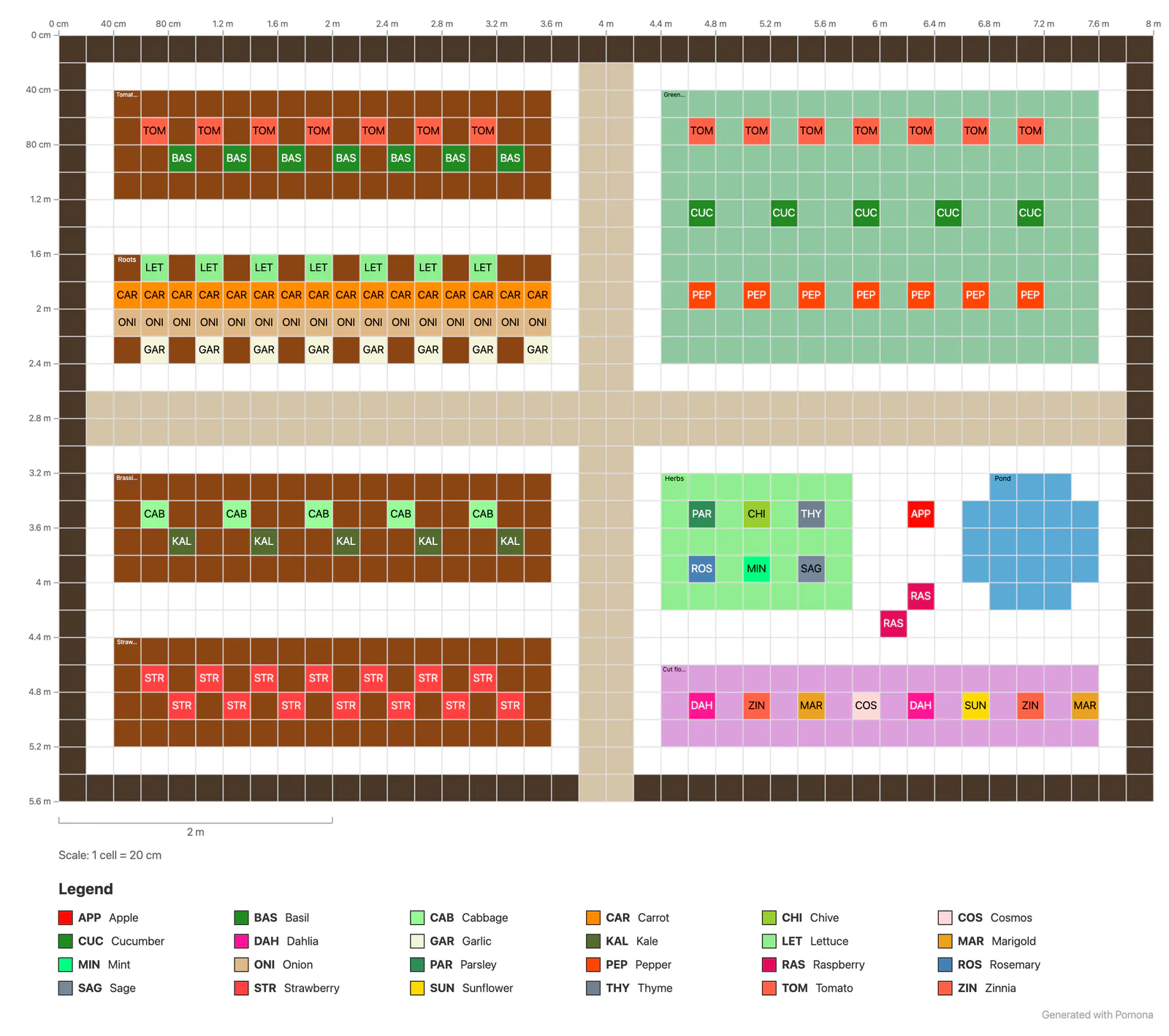

A PNG to print
Export the board or a selection with plant codes or full names, a legend, a scale note, a scale bar and distances along the edges, at up to 3× resolution.
JSON backup
Export any board as a JSON file, with your own plants and their reminders, and import it again as a new board.
CSV from a spreadsheet
Sketch a bed in a spreadsheet with one plant name per cell and import it. Names that match the catalog become those plants, and the rest can become your own.
Everywhere
Plan at the desk and tick jobs off in the garden, with or without a signal.


Computer, tablet and phone
The same gardens in the browser on any screen, with an editor that works by touch on phones.
Install it
Add Pomona to your phone's home screen or install it on your computer, and open it like an app. It tells you when a new version is ready.
Offline
If the connection drops, keep editing the plan: changes are saved on the device and sent when you're back online. The season's to-do list opens without a connection, and the jobs you tick off are sent later.
Sync between devices
Edit on the laptop, check on the phone. If the same cells changed on two devices before they synced, Pomona keeps your version and shows you both, so you can pick.
One editor per board
Open a board in a second tab and it follows the first one live, read-only, until you choose to edit there.
English and Polish, light and dark
Switch the language and the theme whenever you like.
Some features, like more gardens and boards and your own plants, are part of the paid plans. See pricing.